Images are out of focus using a C-mount or CS-mount lens
Last Revision Date: 6/6/2014
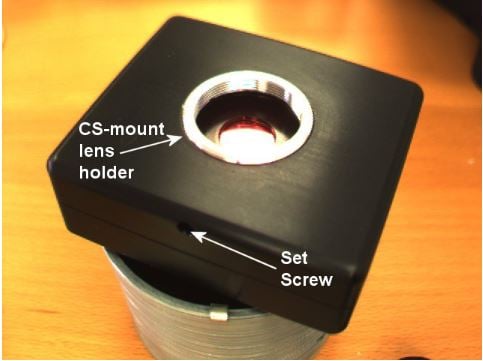
Many of our camera models come equipped with a CS-mount lens holder. This lens holder is designed to accommodate a CS-mount lens, and when equipped with a C-mount lens spacer, a C-mount lens.
Sometimes these lenses will not automatically focus when fully screwed into the lens holder. This is generally due to one of three problems:
-
- The lens format is incompatible with the image sensor format. When purchasing a C- or CS-mount lens, make sure it is compatible with the image sensor size (e.g. 1/3", 2/3", etc.) used by your camera.
- The lens is a C-mount lens. If this is the case, the 5 mm lens spacer must be screwed into the CS-mount lens holder.
- If your camera is equipped with a set screw, as shown below, you can use it to adjust the back focal length, which is the distance from the rear-most portion of the lens to the sensor. To do this, open the lens aperature up completely, focus the lens to infinity, then adjust the lens holder depth. To adjust the depth, locate the small 2 mm screw in the hole on the outside of the camera enclosure and loosen it. By loosening this, the lens holder can be screwed or unscrewed to lower or increase the lens holder depth. After some adjustments of the lens holder depth, the lens should come to a point where it is fully focused. Once this is done, tighten the set screw to fix the lens holder in place.