
Ocular is our capture control software, designed to make it as easy as possible to capture, save and publish images and movies without fuss. Designed with a modern windows ribbon interface Ocular allows users of color and monochrome cameras to capture high-quality images and videos from their microscope or lens system. Our movie capture tools are extremely advanced offering multiple ways to view and capture time-lapse or high speed movies.
In Production
Scientific Image Acquisition Software
What can I do with Ocular?
Monochrome Camera Tools
- Auto Expose, Adjust Exposure and Auto scale
- Snap / Publish and Save
- Maximise Live View for Full Screen Imaging
- Customise and Save your Interface
- Zoom and Region
- Live Tint Capture and Merge
- Select Calibrations, Auto or Pre-set Markers
- Post Process Crop and Merge
- Tint and Merge Acquired Channel
- Alter Display to Increase Image Contrast
- Line Measurements and Profiles

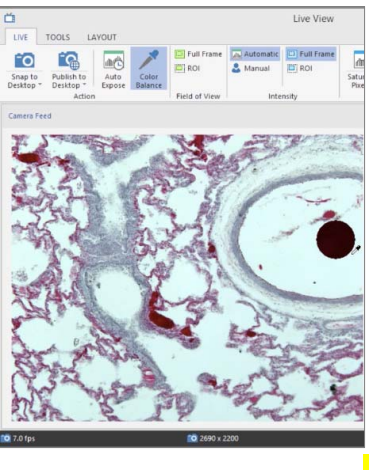
Color Camera Tools
- Auto Exposure and White Balancing
- Snap / Publish and Save
- Maximise Live View for Full Screen Imaging
- Customise and Save your Interface
- Zoom and Region
- Select Calibrations, Auto or Pre-set Markers
- Post Process Crop and Merge
- Single Channel Fluorescence Capture
- Multichannel Fluorescence Capture
Advanced Monochrome Camera Tools
- Auto Exposure and White Balancing
- Snap / Publish and Save
- Maximise Live View for Full Screen Imaging
- Customise and Save your Interface
- Zoom and Region
- Select Calibrations, Auto or Pre-set Markers
- Post Process Crop and Merge
- Single Channel Fluorescence Capture
- Multichannel Fluorescence Capture
Specifications
- Type
- Acquisition & Processing Application
- Operating System
- Windows 7 / Windows 8 / Windows 10 / Linux (only CentOS 7)
- Camera/Frame Grabber Interface Supported
- All Photometric cameras
- Processor
- Intel/AMD
Resources & Support
You must be logged in to download software or firmware. Please sign in or create an account here.

Ocular 2.0

Ocular 2.0 Quick Start Guide
Please visit our Contact Us page and choose "Contact Support" to get in touch with a support engineer.